Singapore
 Australia
 Indonesia
 Japan
Japan Malaysia
 New Zealand
 Philippines
 South Korea
 Taiwan
 Thailand
 VIETNAM
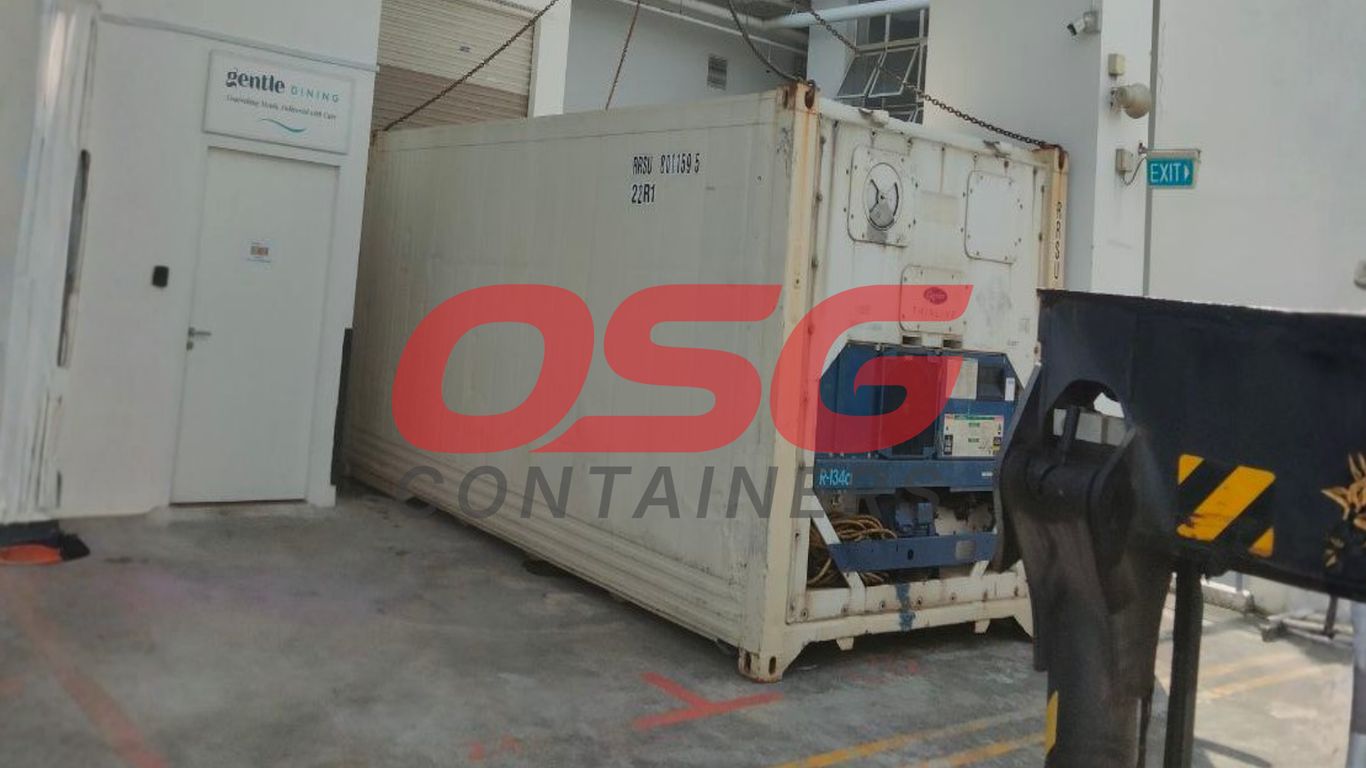
Keeping cntr reefer containers in good shape isn’t just about ticking boxes—it’s about making sure what’s inside gets where it needs to go, safe and sound. Anyone who’s worked with these refrigerated boxes knows a small slip-up can mean a big loss, whether it’s spoiled produce or rejected pharmaceuticals. From the first inspection before loading, to the constant monitoring during the trip, and right through to emergency plans, every step matters. This article breaks down straightforward maintenance and handling routines for cntr reefer containers, focusing on simple actions that actually make a difference.
Key Takeaways
- Always start with a thorough visual and technical check of the cntr reefer before loading any cargo.
- Stick to a regular schedule for checking seals, refrigerant levels, and cleaning coils to keep the unit running smoothly.
- Use real-time tracking and temperature monitoring to catch problems while the container is on the move.
- Know the main parts of the cntr reefer—like insulation, sensors, and power systems—and keep them maintained.
- Have a clear emergency plan and keep good records so you’re ready if anything goes wrong.
Essential CNTR Reefer Pre-Trip Inspection Protocols
Before you even think about loading up your valuable cargo, giving your CNTR reefer unit a thorough once-over is just smart. This isn’t just a quick look; it’s a detailed check to make sure the container and its cooling system are in tip-top shape. Skipping this step is like driving your car without checking the tires – you might get away with it for a while, but eventually, you’re asking for trouble. A good pre-trip inspection (PTI) is your first line of defense against spoiled goods and costly delays.
Visual Check for Structural Integrity and Cleanliness
First things first, let’s do a walk-around. Grab a flashlight and really look at the container, both inside and out. You’re checking for any signs of damage that could compromise the temperature control or the container’s structure. This means looking for:
- Dents, rust spots, or cracks on the exterior panels and corners.
- Damage to the door hinges, latches, and especially the rubber seals (gaskets) around the doors. A good seal is vital for keeping the cold air in.
- Any leftover debris, labels, or residue inside the container. It needs to be clean and odor-free, especially if you’re hauling food products.
- The condition of the floor and walls for any damage or contamination.
A clean interior is just as important as a functioning cooling unit.
Technical Testing Procedures for CNTR Reefer Units
Once the visual check is done and you’re satisfied with the container’s physical state, it’s time to power up the machinery. This is where you confirm the cooling system itself is ready for action. You’ll want to:
- Power On and Set Temperature: Turn on the unit and set your desired temperature. Double-check that you’ve selected the correct unit of measurement (°C or °F). Watch to see if the unit acknowledges the setting and begins its cooling cycle.
- Run Functional Cycles: Operate the unit through its basic functions. This often includes running a cooling cycle and, importantly, a defrost cycle to ensure that system works correctly too.
- Check System Performance: Listen for any unusual noises from the compressor or fans. If possible, check basic operational readings like compressor pressure and electrical current draw to make sure they fall within normal ranges.
This technical testing phase is critical for verifying that the complex machinery is operating as designed. It’s about confirming that the unit can maintain the precise temperatures required for your specific cargo, regardless of external weather conditions.
Calibrating Sensors and Monitoring Devices
Accuracy is key when you’re dealing with temperature-sensitive goods. The sensors and any data logging equipment are what tell you if things are going according to plan. So, you need to make sure they’re spot on:
- Sensor Calibration: Compare the readings from the reefer’s sensors against a calibrated, independent thermometer. If there’s a significant difference, the sensors need to be adjusted or recalibrated.
- Data Logger Check: Verify that the temperature data logger is functioning correctly, has enough memory, and is set to record at the appropriate intervals for the duration of the planned trip.
- Alarm Settings: Confirm that any alarm systems for temperature deviations are active and set to the correct thresholds.
Keeping detailed records of these inspections, including any issues found and the steps taken to fix them, is also a really good idea. It’s your proof that you did everything you could to protect the shipment.
Preventative Maintenance for CNTR Reefer Longevity
Keeping those CNTR reefer units humming along smoothly is all about staying ahead of the game. It’s not just about fixing things when they break; it’s about doing regular check-ups so they don’t break in the first place. Think of it like taking care of a classic car – a little attention now saves a lot of heartache later.
Regular Inspection of Seals and Connections
Those rubber seals around the doors might seem small, but they’re super important. If they’re cracked, torn, or just not sealing right, cold air can sneak out and warm air can creep in. This makes the whole unit work overtime, burning more power and putting extra strain on the machinery. We need to check these seals every time, looking for any signs of wear and tear. It’s also a good idea to check all the electrical connections and wiring harnesses. Loose or corroded connections can cause all sorts of electrical gremlins, leading to power interruptions or system malfunctions. A quick visual check and a gentle tug on visible wires can catch a lot of potential problems before they even start.
Monitoring Refrigerant Levels and Coil Cleaning
Refrigerant is the lifeblood of the cooling system. If the levels are low, it usually means there’s a leak somewhere, and the unit just won’t cool as effectively. We need to keep an eye on these levels and address any drops promptly. It’s also vital to keep the condenser and evaporator coils clean. Dust, dirt, and other gunk can build up on these coils, blocking airflow and making the unit work much harder to achieve the desired temperature. Regular cleaning, often done during scheduled maintenance, makes a big difference in efficiency and prevents overheating.
Baseline Maintenance Cadence by Usage
Not all reefer containers get used the same way, so their maintenance schedules shouldn’t be identical. A unit that’s constantly on the move, hauling high-turnover cargo, will need more frequent attention than one that sits idle for long stretches. We can set up different maintenance cycles based on how much a container is used. For example, a busy fleet might get a thorough check every four weeks, while a moderately used one could go eight weeks, and a container that’s mostly parked might only need attention every twelve weeks. This tailored approach helps us focus our resources where they’re needed most and ensures each unit gets the right level of care.
Keeping detailed logs of all maintenance performed is non-negotiable. This record-keeping isn’t just for compliance; it’s a history of the unit’s health, helping to predict future issues and justify replacement parts or service calls. If something goes wrong, these logs are your best defense.
Here’s a quick look at how usage might affect maintenance frequency:
- High Usage (Frequent Transit, High Turnover): Aim for inspections and basic checks every 4 weeks.
- Moderate Usage (Regular but Less Intense): An 8-week cycle for inspections is generally suitable.
- Low Usage (Dormant or Infrequent Use): A 12-week cycle can often suffice for basic checks, with more thorough inspections before deployment.
This isn’t a rigid rulebook, of course. The actual condition of the unit and any specific cargo requirements will always play a part in deciding when the next service is due.
In-Transit Management and CNTR Reefer Monitoring
Once your cargo is loaded and the reefer unit is humming along, the real work of keeping it at the right temperature begins. This is where in-transit management and monitoring come into play. It’s not just about setting it and forgetting it; it’s about staying on top of things while the container is making its way to its destination. The journey itself can throw curveballs, like unexpected weather changes or delays, and that’s why keeping a close eye on your reefer is so important.
Continuous Monitoring During Shipment
Keeping tabs on your reefer while it’s moving is pretty straightforward with today’s tech. You want to make sure the temperature stays exactly where it needs to be, without any big swings. This means checking the readings regularly, or even better, having a system that alerts you if something starts to go off track. It’s like having a watchful eye on your cargo 24/7.
- Check the temperature logs at set intervals (e.g., every hour or two).
- Verify the reefer unit is running and maintaining the set point.
- Note any unusual noises or vibrations from the unit.
The Role of Technology: GPS and Real-Time Temperature Tracking
This is where things get really interesting. Modern reefer containers are equipped with sophisticated telematics systems. These systems do more than just tell you where the container is; they provide a constant stream of data about the internal temperature, humidity, and the operational status of the refrigeration unit itself. This real-time data is your best friend for preventing cargo damage. You can usually access this information through a web portal or an app, giving you visibility no matter where you are.
| Data Point | Typical Update Frequency | Importance |
|---|---|---|
| GPS Location | Every 15-30 minutes | Tracking shipment progress, route adherence |
| Internal Temperature | Every 5-15 minutes | Confirming cargo safety, detecting excursions |
| Unit Status | Real-time | Monitoring cooling cycles, identifying faults |
Addressing Cargo-Specific Handling Protocols
Different types of cargo have different needs, even within the refrigerated category. For instance, fresh produce might need a bit of airflow, while frozen goods need a consistent, deep freeze. It’s important to know these specifics and make sure the reefer is set up correctly for whatever you’re shipping. This might involve adjusting humidity levels, airflow settings, or even the specific temperature set point.
Understanding the unique requirements of your cargo is key. A one-size-fits-all approach won’t work for temperature-sensitive goods. Always consult the product’s handling guidelines and communicate them clearly to your logistics provider.
- Frozen goods: Require consistent, very low temperatures (e.g., -18°C / 0°F).
- Fresh produce: May need specific temperature ranges and controlled humidity to prevent spoilage.
- Pharmaceuticals: Often have extremely narrow temperature tolerances and require detailed data logging for compliance.
CNTR Reefer System Components and Their Maintenance
Insulation Materials and Their Significance
The walls of a reefer refrigerated container aren’t just metal. They’re packed with insulation, usually a thick layer of polyurethane foam. This stuff is key because it acts like a thermos, keeping the cold air in and the warm air out. Good insulation means the refrigeration unit doesn’t have to work as hard, saving energy and keeping temperatures steady. Without it, the outside heat would quickly warm up your reefer cargo, no matter how powerful the cooling system is. Think of it as the first line of defense for your temperature-sensitive goods.
Temperature Recording Devices and Data Logging
Every reefer container worth its salt has a way to track the temperature inside. These aren’t just simple thermometers; they’re sophisticated devices that record temperature readings over time. This data logging is super important. It gives you a clear history of the conditions your reefer cargo experienced during its journey. If there’s ever a question about temperature fluctuations, this log is your proof. It helps with quality control and can be vital if you need to make an insurance claim.
- Data Logger Functionality: Records temperature at set intervals.
- Accuracy Checks: Regular verification against a calibrated thermometer.
- Data Retrieval: Easy access to download logs for analysis.
- Anomaly Alerts: Some systems can flag unusual temperature spikes or drops.
Power Supply Systems and Control Panels
Refrigerated containers need a steady stream of power to keep running. This comes from the ship, a generator, or shore power. The control panel is your main interface with the unit. It’s where you set the temperature, check the status, and sometimes even run diagnostics. These panels are getting smarter all the time, offering more detailed information and easier ways to manage the reefer. It’s important to know how to use yours properly, especially when dealing with different settings for various types of reefer cargo.
Keeping these systems in good working order is non-negotiable. A failure in the power supply or a glitch in the control panel can quickly turn a successful shipment into a costly problem. Regular checks on connections and the control panel’s display are a smart move.
Maintenance Schedule Example:
| Component | Inspection Frequency | Action |
|---|---|---|
| Insulation Integrity | Annually | Check for damage, gaps, or wear |
| Temperature Data Logger | Monthly | Test functionality, download recent data |
| Power Supply Connectors | Bi-monthly | Inspect for corrosion, tightness |
| Control Panel Display | Weekly | Verify readability, check for error codes |
Developing Emergency Response Plans for CNTR Reefers
When something goes wrong with a CNTR reefer, there’s usually very little time to react before perishable cargo is affected. That’s why a proper emergency response plan isn’t just some formality—it’s a daily necessity.
Identifying Equipment Malfunctions Early
Finding problems before they turn into disasters is the real trick here. Regular monitoring is key, but you also want a plan for catching issues as soon as possible. Here’s what usually works:
- Run checks on power supply and unit startup every time before loading.
- Listen for funny noises, watch for weird smells, and feel for unusual warmth near electrical components.
- Double-check temperature readouts; if it doesn’t match what you set, don’t ignore it.
A little vigilance can save thousands of dollars in lost cargo, especially when handling temperature-sensitive goods like seafood, produce, or pharmaceuticals.
Contingency Planning for System Failures
If the refrigeration system suddenly fails mid-transit, you have to act fast. These steps help prevent losses:
- Set up a list of approved service providers along major transport routes.
- Record the contact info for all parties involved, like the carrier, shipper, and logistics coordinator.
- Arrange for backup power (such as clip-on generators) or access to cold storage at key locations.
- Establish clear cargo transfer procedures if a container swap is needed.
A simple decision table helps clarify when an action is urgent versus when it can wait:
| Failure Type | Response Timeframe | Recommended Action |
|---|---|---|
| Total Power Loss | Within 15 mins | Engage backup generator or transfer cargo |
| Partial Cooling Drop | Within 30 mins | Call repair; monitor temp shifts |
| Sensor/Error Alert | Within 1 hour | Manual inspection & documentation |
Establishing Escalation Paths and Notifications
Nobody wants to discover a problem after it’s already ruined a shipment. Setting up clear escalation paths and prompt notifications keeps everyone in the loop, which makes a big difference.
- Create a group call/text list that immediately alerts key staff if any reefer alarm goes off.
- Use automated tracking systems to escalate urgent notifications to operations managers.
- Keep customers informed—if it’s their cargo at risk, quick updates let them plan next steps.
Fast communication isn’t just about solving problems—it also reassures clients their shipments are in good hands, even when issues pop up unexpectedly.
Training and Documentation for CNTR Reefer Operations
Most reefer headaches boil down to two things: someone didn’t know what to do, or they didn’t write down what they did. That’s why getting your team trained up and religious about documentation is key if you want to avoid frantic calls and expensive cargo problems later.
Training for Operators on Temperature Control Systems
Getting your crew comfortable with reefer controls matters more than fancy tech. It’s not enough just to know how to turn it on—people need to understand how their actions show up on the data trail and what to watch for when things go sideways. Here’s what every operator should cover:
- Setting and adjusting temperature setpoints the right way.
- Reading live sensor data and catching out-of-range warnings.
- Running quick troubleshooting steps (power resets, sensor checks).
- Understanding what to record before, during, and after a trip.
A hands-on session—even just in the yard—beats hours of online training videos every single time. Let them press the buttons, run a dummy load, and sort out issues in a safe space before real cargo shows up.
Record Keeping and Data Traceability
If you don’t log it, it didn’t happen. Detailed record keeping is what lets you defend your service (and your insurance claim) when stuff goes wrong. Here’s the baseline for solid documentation:
| Log Item | Details Needed |
|---|---|
| Date/Time | When each inspection or action happened |
| Unit ID | Which reefer this is for |
| Hours/Mileage | Usage info since last check |
| Inspector | Name/signature of the person who checked |
| Items Checked | What was reviewed on this round |
| Issues Noted | Anything needing attention |
| Corrective Actions | What was done/fixed |
Make sure these logs are easy to find and organized by unit.
Ensuring Compliance with Documentation Standards
Some rules—especially food and pharma—aren’t just recommendations. They’re hard requirements. Staying on the right side of the law (or your customer’s quality team) means:
- Saving proof of all pre-trip inspections and cleaning steps.
- Archiving temperature tracking data for every trip.
- Including training certificates for every operator who touched the reefer.
- Using standardized forms to avoid gaps or confusion.
A strong documentation habit isn’t just about covering yourself—it speeds up finding problems, proving quality, and keeping customers happy.
Wrapping It Up
So, keeping those reefer containers running smoothly really comes down to a few key things. It’s about being proactive with checks, fixing small stuff before it blows up, and using the tech we have to keep an eye on things. When you get the maintenance right and pay attention to the details, you’re not just protecting the cargo, you’re also saving yourself a lot of headaches and potential money down the line. It’s a lot of work, sure, but for keeping those sensitive goods in good shape, it’s totally worth it.
Frequently Asked Questions
What is a pre-trip inspection for a reefer container, and why is it important?
A pre-trip inspection is like a quick check-up before a reefer container starts its journey. It involves looking over the container’s outside and inside for any damage, making sure it’s clean, and testing all the cooling parts to see if they’re working right. This is super important because it helps catch small problems early, stopping them from turning into big issues that could ruin your cargo.
How often should reefer containers get regular maintenance?
How often a reefer container needs maintenance depends on how much it’s used. For containers that are used a lot, like every four weeks, they might need checks more often. If they’re used less, maybe every eight or twelve weeks is fine. It’s like changing the oil in your car – doing it regularly keeps things running smoothly and prevents bigger problems later on.
What does ‘in-transit monitoring’ mean for reefer containers?
In-transit monitoring means keeping a close eye on the reefer container while it’s on its way to its destination. This uses technology, like GPS and special sensors, to track where the container is and make sure the temperature inside stays just right. If the temperature starts to go up or down too much, an alert is sent out so someone can fix it quickly, protecting the cargo.
What are the main parts of a reefer container that need maintenance?
The key parts of a reefer container that need regular care are the insulation, which keeps the cold air in, the devices that record the temperature, and the power systems that keep everything running. The control panel, where you set the temperature, also needs to be checked. Making sure these parts are in good shape helps the container do its job perfectly.
What should we do if a reefer container breaks down during a trip?
If a reefer container stops working during a trip, it’s important to have a plan ready. This means knowing who to call for help right away and what steps to take to try and save the cargo, like maybe moving it to another container if possible. Having a plan helps everyone act fast to reduce any damage or loss.
Why is training and good record-keeping important for reefer container operations?
Training people on how to use and check reefer containers correctly is vital for making sure they work well. Keeping good records of all the checks, maintenance, and any problems is also super important. This paperwork acts as proof that everything was done right, which is useful for checking quality and if any questions come up later.