Singapore
 Australia
 Indonesia
 Japan
Japan Malaysia
 New Zealand
 Philippines
 South Korea
 Taiwan
 Thailand
 VIETNAM
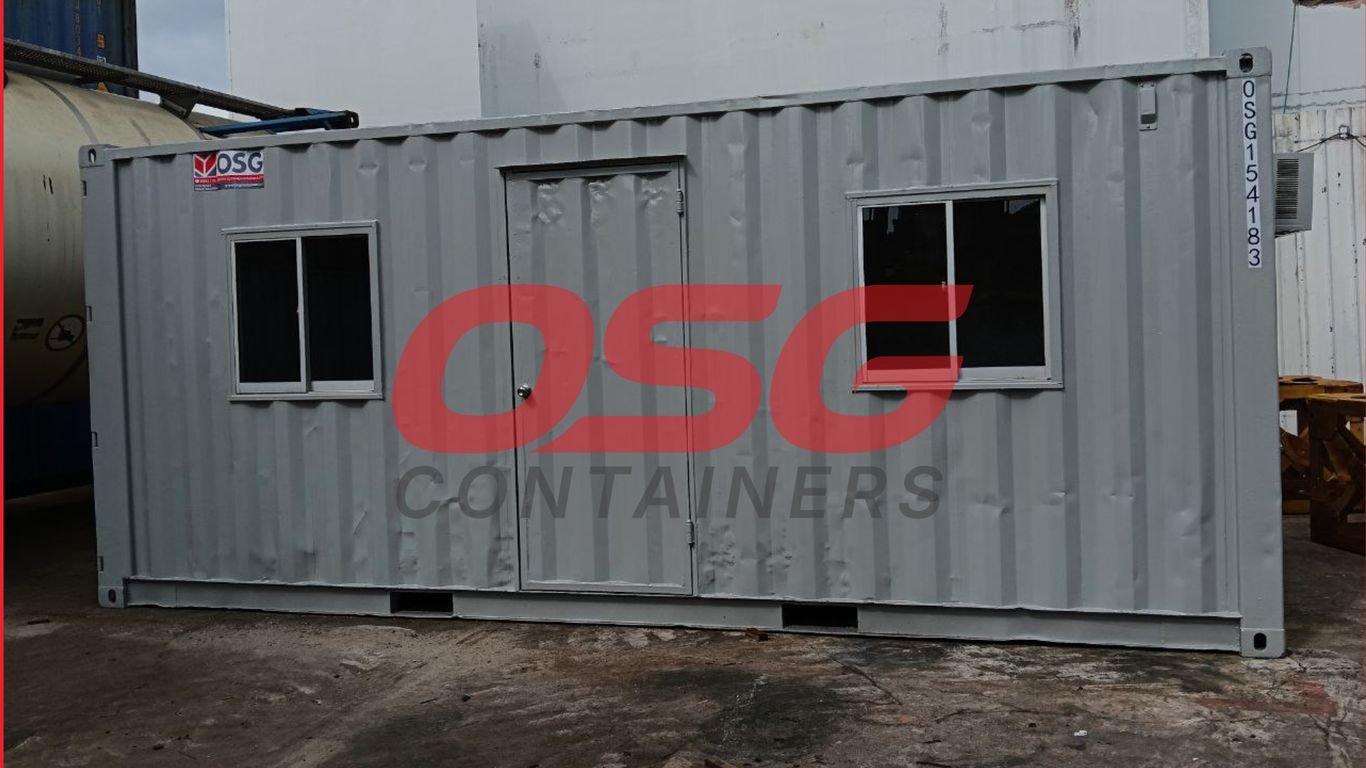
Setting up a functional workspace on-site doesn’t have to be complicated. Whether you’re managing a construction project or running a field operation, a mobile site office can make a big difference. It’s about having a dedicated space that works for you, right where the action is. We’ll look at how to get the most out of these flexible setups, from planning the layout to equipping it properly.
Key Takeaways
- Designing your mobile site office starts with understanding your specific needs, optimizing the layout for how your team works, and creating separate areas for different tasks.
- Customizing your site office involves interior changes for comfort, exterior additions for site utility, and integrating technology for smooth operations.
- Equipping your site office means getting the right furniture, setting up reliable power, and ensuring good internet access to keep everyone productive.
- Managing your site office well includes having clear procedures, keeping the space tidy, securing it properly, and planning for different weather conditions.
- Choosing the right site office solution means looking at different structure types, finding good suppliers, and checking all the details of what’s offered.
Designing Your Ideal Site Office
Setting up a mobile site office isn’t just about getting a structure on-site; it’s about creating a functional workspace that actually helps your team get things done. Think of it as building the nerve center for your project, right where the action is. Getting the design right from the start means fewer headaches later on.
Assessing Your Site Office Needs
Before you even look at floor plans, take a good, hard look at what you actually need this office to do. Who’s going to be in it? How many people on a regular basis? What kind of work will they be doing? Is it mostly administrative tasks, client meetings, or will it be storing important documents and materials? Answering these questions helps you figure out the size, layout, and features you’ll need.
Here’s a quick checklist to get you thinking:
- Occupancy: How many people will regularly use the space?
- Primary Activities: What are the main tasks performed inside (e.g., admin, meetings, planning, storage)?
- Equipment Needs: What technology or tools need to be housed (computers, printers, specialized gear)?
- Storage Requirements: What materials, documents, or tools need secure storage?
- Client Interaction: Will clients be visiting the office? If so, what impression do you want to make?
Understanding these core requirements upfront prevents you from ending up with a space that’s too small, too cramped, or missing key functionalities. It’s about tailoring the solution to the job, not the other way around.
Optimizing Layout for Workflow
Once you know your needs, it’s time to think about how people will move and work within the space. A good layout supports how your team operates. If your project managers constantly need to refer to blueprints or site plans, make sure those are easily accessible. If meetings are frequent, a dedicated spot for that makes sense. Think about traffic flow – where will people enter and exit? Where will they set up their workstations? Positioning things logically can make a big difference in daily efficiency.
Creating Distinct Functional Zones
Even in a compact mobile office, you can create different areas for different purposes. This helps keep things organized and reduces distractions. You might want a clear separation between a work area with desks and computers, a small meeting space, and a secure storage zone for tools or sensitive documents. Having these distinct zones means people can focus on their tasks without being constantly interrupted by other activities happening in the same room. It’s about making the most of every square foot.
Customizing Your Mobile Site Office
Once you’ve got the basic structure of your mobile site office, it’s time to make it truly yours. This isn’t just about putting a desk in a box; it’s about tailoring the space to fit how your team actually works and making it a place where people can be productive and comfortable. Think of it as building a custom tool, not just buying a standard one.
Interior Modifications for Comfort and Function
The inside of your site office needs to work hard. You’ll want to think about insulation, especially if you’re in a place with extreme temperatures. Good insulation means less strain on your heating and cooling systems and a more pleasant environment for your staff. Beyond that, consider how you’ll divide the space. Even a simple partition can create a separate area for meetings or quiet work, which makes a big difference in how the office functions day-to-day. Adding finished flooring, like vinyl or linoleum, is also a good idea – it’s durable and easy to clean, which is a must on a busy worksite.
- Insulation: Keeps temperature stable, reducing energy use.
- Interior Partitions: Create distinct zones for different tasks.
- Finished Flooring: Durable, easy to clean, and professional-looking.
- Lighting: Ensure adequate overhead and task lighting.
Making the interior functional is key. Think about where people will spend most of their time and what they’ll be doing. Small changes can have a big impact on daily comfort and efficiency.
Exterior Enhancements for Site Utility
Don’t forget the outside. The exterior can be modified to add practical features that make the office more useful on site. Adding extra doors can improve access, especially if the office is positioned in a tight spot. Security features are also important – think about sturdy locks, maybe even window bars if your site is in a high-risk area. Exterior lighting is another good addition, making it safer for people to get to and from the office after dark. Some companies even offer custom paint jobs or company branding, which can make the office look more professional.
- Additional Doors: Improve entry and exit flow.
- Security Features: Locks, bars, and alarm systems.
- Exterior Lighting: For safety and extended usability.
- Ramps or Steps: Ensure easy access for everyone.
Integrating Technology for Seamless Operations
Modern worksites rely on technology, and your site office should too. This means thinking about how you’ll get power and internet to the unit, but also how you’ll manage it all. Pre-wiring for data ports makes setting up computers and other devices much simpler. Mounting points for screens can be useful for presentations or displaying important information. Good cable management keeps things tidy and prevents tripping hazards. You might also need a dedicated space for technical equipment, like servers or communication gear, to keep it secure and organized.
| Feature | Benefit |
|---|---|
| Pre-wired Data Ports | Easy setup for computers and networks. |
| Screen Mounting Points | Convenient for presentations and info display. |
| Cable Management | Reduces clutter and improves safety. |
| Dedicated Tech Space | Secure and organized storage for equipment. |
Integrating technology thoughtfully can turn a basic site office into a connected hub for your entire operation.
Essential Equipment for Site Office Productivity
Setting up a mobile site office isn’t just about the structure itself; it’s about equipping it so your team can actually get work done efficiently. Think of it as your on-site command center. Without the right gear, even the fanciest trailer can feel like a storage closet.
Furnishing Your Workspace
First things first, you need a place to sit and a surface to work on. Don’t skimp here. A sturdy desk and a chair that doesn’t make your back ache after an hour are non-negotiable. Durability is key, as this furniture will likely see some heavy use. Beyond that, consider how your team will manage paperwork and supplies.
- Desks: Look for surfaces that can handle a bit of wear and tear. Folding legs can be useful if you need to reconfigure the space.
- Chairs: Ergonomics matter. A comfortable chair can make a big difference in long workdays.
- Storage: Filing cabinets, shelving units, and even wall-mounted organizers help keep the space tidy and materials accessible. Think about what kind of documents or tools need to be stored and choose solutions accordingly.
Keeping your workspace organized from day one prevents clutter from piling up. A tidy office leads to a clearer mind and fewer mistakes.
Establishing Reliable Power Infrastructure
No power, no productivity. This is a big one. You’ll need enough electrical capacity to run computers, lights, communication devices, and maybe even a small fridge or microwave. Plan for more outlets than you think you’ll need, and make sure they’re conveniently located.
- Amperage: Ensure the power supply can handle all your equipment simultaneously. Check the wattage requirements for everything you plan to plug in.
- Outlets: Distribute outlets throughout the office space. Consider surge protectors to safeguard electronics.
- Backup Power: Depending on your location and the criticality of continuous operation, a generator or UPS (Uninterruptible Power Supply) might be a wise investment.
Ensuring Robust Internet Connectivity
In today’s world, reliable internet is as important as electricity. Whether it’s for communication, accessing cloud-based project management tools, or sending reports, a stable connection is vital. You have a few options here, and the best choice often depends on the site’s location and available infrastructure.
- Mobile Hotspots: These are great for flexibility and can be moved around, but data limits and signal strength can be issues.
- Dedicated WiFi Solutions: Some providers offer temporary WiFi setups for job sites, which can be more stable than hotspots.
- Hardwired Connections: If available, a direct cable connection offers the most reliable performance, though it might be less flexible.
Choosing the right combination of furniture, power, and internet will transform your mobile site office from a basic shelter into a fully functional workspace.
Best Practices for Site Office Management
Keeping your mobile site office running smoothly is key to keeping your project on track. It’s not just about having a place to sit; it’s about making that space work for you, day in and day out. Think of it like maintaining any other piece of equipment on site – if you let it slide, things start to break down.
Establishing Clear Operational Procedures
First things first, everyone needs to know the rules of the road. This means setting down in writing how the office is supposed to function. Who can use it and when? How do you check out tools or materials if you’re storing them there? Having these guidelines posted and understood by the whole team prevents confusion and potential misuse. It’s about accountability.
- Access Control: Define who has keys or codes and when the office is officially open for use.
- Inventory Management: If supplies or small equipment are stored, implement a simple sign-out sheet.
- Communication Protocols: How should urgent messages be relayed through the office if needed?
A well-defined procedure acts as the backbone of an efficient site office, minimizing disputes and maximizing operational flow.
Maintaining Organization and Cleanliness
This is a big one. A messy office is a distraction, and frankly, it looks bad. It’s easy for things to pile up, especially when everyone’s busy. Make it a habit to tidy up at the end of each day. Assigning specific spots for tools, paperwork, and personal items makes a huge difference. Regular cleaning, not just tidying, is also important for health and morale.
- Daily Tidy-Up: A quick 10-minute sweep at the end of the workday.
- Weekly Deep Clean: A more thorough cleaning of surfaces, floors, and restrooms if applicable.
- Designated Storage: Use shelves, cabinets, and organizers so everything has a place.
Implementing Robust Security Measures
Your site office likely holds valuable documents, tools, or even sensitive equipment. Protecting these assets is non-negotiable. This means making sure doors and windows are locked securely whenever the office is unattended. Consider additional security like external lighting or even a basic alarm system, especially if the site is remote or prone to issues. Regular checks of locks and security systems are also a good idea.
Planning for Environmental Conditions
Mobile offices are tough, but they aren’t invincible. You need to think about the weather. Is the heating and cooling system working properly? Are there any drafts or leaks? Regular checks on the HVAC system are a must. For extreme weather, have a backup plan. This could be as simple as knowing where the nearest alternative shelter is or having extra blankets and water on hand. Proper insulation and weatherproofing can prevent a lot of headaches down the line.
Choosing the Right Site Office Solution
So, you’ve decided a mobile site office is the way to go. That’s a smart move for keeping your project on track and your team comfortable. But not all site offices are created equal, and picking the right one can feel a bit overwhelming. It’s not just about getting a box on wheels; it’s about finding a space that actually works for your crew and your specific job.
Evaluating Mobile Office Structure Types
There are a few main types of structures you’ll run into, each with its own pros and cons. Think about how long you’ll need it, what kind of security you need, and what the site conditions are like.
- Container Offices: These are usually built from shipping containers. They’re tough, secure, and pretty weather-resistant right off the bat. You can get them in standard sizes like 20-foot or 40-foot lengths. They’re great if you need something durable and don’t mind a more industrial look, especially if you plan on doing some modifications.
- Prefabricated/Modular Offices: These are built off-site and then delivered. They often look more like traditional offices, with better insulation and finishes. They can be a good option if you need a more comfortable, long-term setup and appearance is a factor.
- Tents/Temporary Structures: Honestly, these are usually only good for very short-term needs, like a single-day event. They don’t offer much in the way of security, climate control, or tech integration. I’d steer clear for anything more than a few days.
The key here is to match the structure type to the duration and demands of your project. A cheap, flimsy option now can lead to bigger headaches and costs down the line.
Researching Quality Providers
Once you know what kind of structure you’re leaning towards, you need to find someone to get it from. This is where a little digging pays off. You want a provider that knows what they’re doing, especially in the construction or industrial space.
- Look for Experience: How long have they been doing this? Do they have examples of projects similar to yours?
- Check Their Services: Do they just drop it off, or do they help with setup, modifications, and even maintenance?
- Customer Reviews: What are other people saying about them? Are they responsive? Do they deliver on promises?
Don’t just go for the cheapest quote; consider the overall value and reliability. A good provider will be a partner in making your site office work.
Reviewing Specifications and Services
This is where you get into the nitty-gritty details. You need to know exactly what you’re getting.
| Feature | Standard Offering | Potential Upgrade/Add-on | Notes |
|---|---|---|---|
| Dimensions | 8’x20′ | 8’x40′, custom | Consider number of occupants and functions |
| Insulation | Basic | Full | Important for climate control |
| HVAC | Optional | Included | Heating and cooling are vital |
| Electrical | Basic outlets | More outlets, lighting | Plan for your equipment needs |
| Internet Prep | None | Wired ports, WiFi | Critical for modern operations |
| Security | Standard locks | Bars, alarms | Depends on site and stored items |
| Delivery & Setup | Varies | Included, site prep | Factor in logistics and site access |
Make sure you understand what’s included in the base price and what will cost extra. Ask about delivery timelines, setup requirements, and any ongoing support they offer. It’s better to clarify everything upfront than to be surprised later.
Benefits of a Mobile Site Office
Setting up a mobile site office, especially something as sturdy as a 20 foot container converted into a workspace, brings a lot to the table. It’s not just about having a place to sit; it’s about making your whole operation run smoother.
Boosting Productivity and Decision-Making
Having your team right there on-site, in a dedicated space like a 20ft container office, cuts down on a ton of wasted time. No more long drives back and forth to a main office. People can talk face-to-face, sort out problems quickly, and make decisions on the spot. This means projects move along faster. Think about it: if a question pops up, someone can walk over, discuss it, and get an answer in minutes, not hours. This kind of immediate feedback loop is a game-changer for keeping things on schedule.
Achieving Significant Cost Reductions
Using container offices can really save money. Instead of paying for travel time, fuel, and maybe even overnight stays for workers who are far from the main office, you provide a local hub. For remote jobs, this can cut down operational expenses quite a bit. A 20 foot office unit, once set up, becomes a fixed point that reduces the need for constant travel. This translates directly into savings that can be put back into the project or the business.
Enhancing Work-Life Balance and Team Connectivity
It might seem odd, but a mobile site office can actually make people feel more connected and less stressed. When workers don’t have to commute for hours each day, they have more personal time. This leads to happier employees and often, better retention. Plus, even though the office is mobile, modern tech means teams can stay in touch easily. It creates a professional environment where people can collaborate effectively, even if they’re spread out across a large site. It bridges the gap between being remote and being disconnected.
The shift towards mobile site offices, particularly adaptable solutions like 20 foot container offices, is driven by practical needs. They offer a professional, secure, and functional workspace directly where the work is happening. This proximity simplifies logistics, speeds up communication, and ultimately makes projects more efficient and cost-effective. It’s a smart move for any operation that relies on on-site presence.
Here’s a quick look at what you gain:
- Faster Problem Solving: Immediate access to project managers and decision-makers.
- Reduced Travel Expenses: Less fuel, vehicle wear, and time spent commuting.
- Improved Morale: More personal time for employees leads to better job satisfaction.
- Professional Image: A dedicated office space for client meetings and site supervision.
- Secure Storage: A safe place for important documents and equipment.
Bringing It All Together
So, we’ve looked at how setting up a mobile office, whether it’s a simple container or a more tricked-out setup, can really change how a worksite runs. It’s not just about having a place to sit; it’s about making things smoother, safer, and more productive. From getting the right lighting and security sorted to making sure everything’s organized, these spaces can make a big difference. Plus, with all the ways you can customize them, you can really build a workspace that fits exactly what your project needs. It’s about making your job easier, no matter where you are.
Frequently Asked Questions
What exactly is a mobile site office?
Think of a mobile site office as a portable workspace. It’s a structure that can be moved to different job locations, equipped with everything you need to work, like desks, chairs, power, and internet. It’s perfect for when your work takes you away from a traditional building.
Why would my team need a mobile office on a job site?
Having an office right at the job site makes things way more efficient. Your team can make decisions faster because they’re right there, communication is easier, and less time is wasted traveling back and forth. It also gives you a professional spot to meet clients.
What kind of equipment should I put inside my mobile office?
You’ll want the basics like a sturdy desk and a comfy chair. Don’t forget storage like filing cabinets or shelves for your papers and tools. Good lighting is a must, along with reliable power for your computers and a strong internet connection so everyone can stay connected.
How do I make sure my mobile office stays organized and secure?
Keeping things tidy is key! Set up clear places for everything and encourage your team to put things back. For security, make sure you have good locks on doors and windows, especially when no one is around. Keeping valuable equipment safe is super important.
Are there different types of mobile offices, and how do I pick one?
Yes, there are several types, often made from sturdy containers, which are very secure and weather-resistant. When choosing, think about how long you’ll need it, how many people will use it, and what specific features your job requires. Always compare different companies and what they offer.
Can I customize a mobile office to fit my specific needs?
Absolutely! Many mobile offices, especially container ones, can be changed a lot. You can add extra doors or windows, put in heating and cooling, set up more electrical outlets, or even divide the space into different work areas. You can really make it work perfectly for your team.